Wayfinding Planner v1.2: meet the multi-sided signs


What’s new#
In short: it’s a big one.
#Multi-sided signs
The key feature in v1.2 is undoubtedly the introduction of signs—and not just signs, but multi-sided signs.
Users can now create signage plans using single-sided, double-sided, as well as custom multi-sided sign designs. The process is as easy as creating another sign type in our refreshed Sign Type Manager:
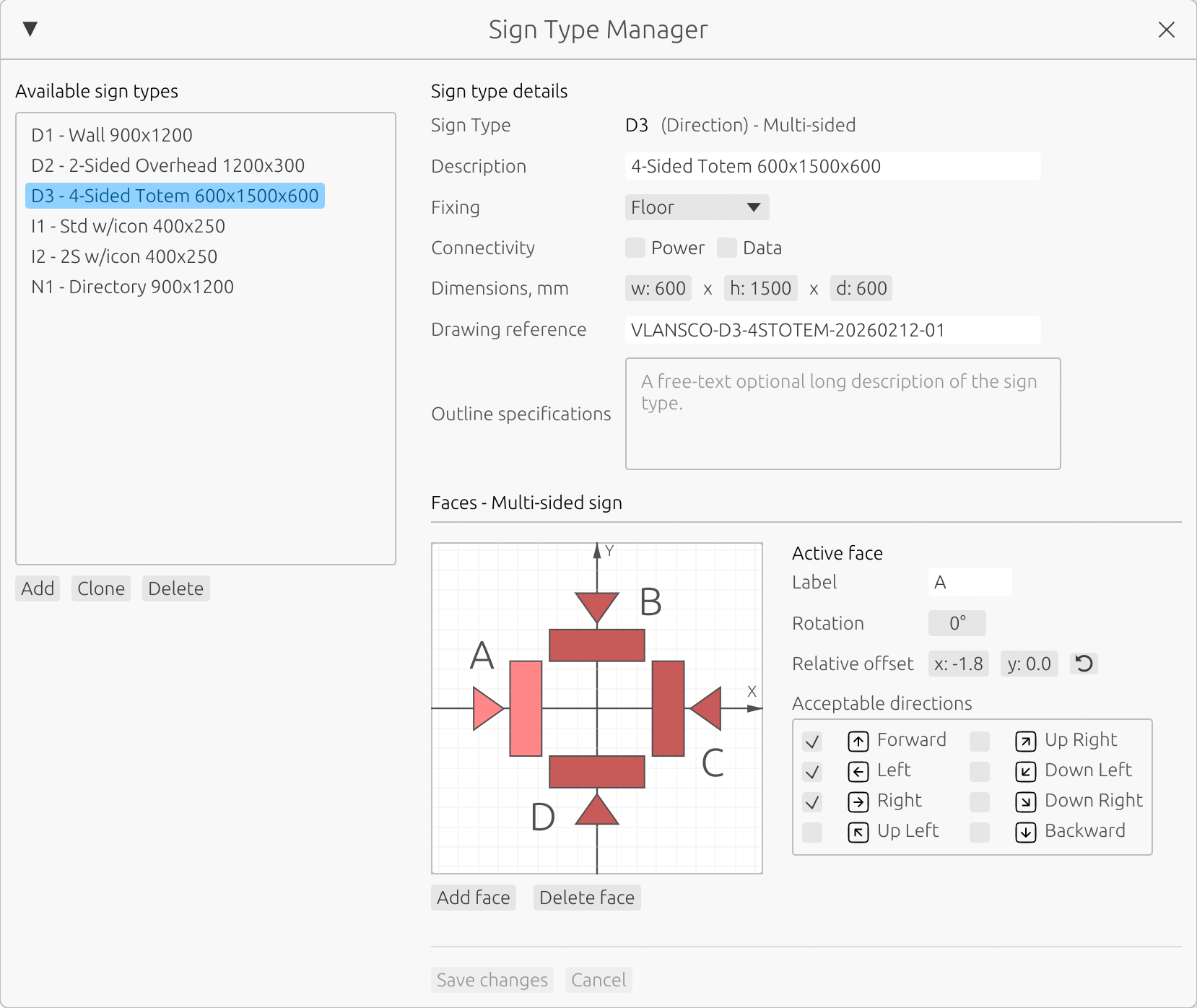
Imagine you’re using a custom two-, three-, or N-sided totem: open the Sign Type Manager, create a new sign type, configure its faces, and then use that type to place signs as usual: attach a sign to any decision point in your path network, position it, rotate it, and you’ll see messages automatically generated for every face—aligned with its orientation and the acceptable directions you’ve defined.
Open the app and go to Project -> Sign Type Manager in main menu to create your first custom multi-sided sign type.
#UX tweaks
Besides the multi-sided signs, v1.2 includes many small but important UX improvements that make everyday life much easier:
- Multiple object selection, with cut/copy/paste/delete and undo/redo support across project changes
- New sign ID re-enumeration option: re-enumerate sign IDs of a specific type on a specific level or across the entire project, or re-enumerate all signs on a level (or across the project)
- More flexible project reports: sign location plans can now include not only signs, but also selected path network elements (for example, target points and their names) to make plans clearer whenever it is required
- Drag-and-drop project file opening on macOS, Windows, and Web, plus file association on native platforms
- and many more small but smart enhancements
Getting started with v1.2#
#Existing users
Existing users can update by downloading and installing v1.2.
Projects created in v1.0 and v1.1 will open in v1.2 and will be saved using a new file format. Existing sign faces will be automatically converted to v1.2 single-faced signs.
Please note that after conversion, the project file can’t be opened in earlier versions of the app. While we’ve thoroughly tested the upgrade path, we strongly recommend backing up your work before moving to a new version.
#New to Wayfinding Planner?
If you’re new to Wayfinding Planner, now is a great time to explore how to create optimized sign location plans, message schedules, and sign type schedules—all in one unified application.
Find out more:
- Visit our home page to get a quick overview.
- Check out our support center to get started faster.
- Download macOS or Windows bundle or open the web version to give it a try.